Pricing & Strategy
How to Manage Your SaaS Stack: The Tools You Actually Run by Year Two
By Muhammad Usman • July 2026
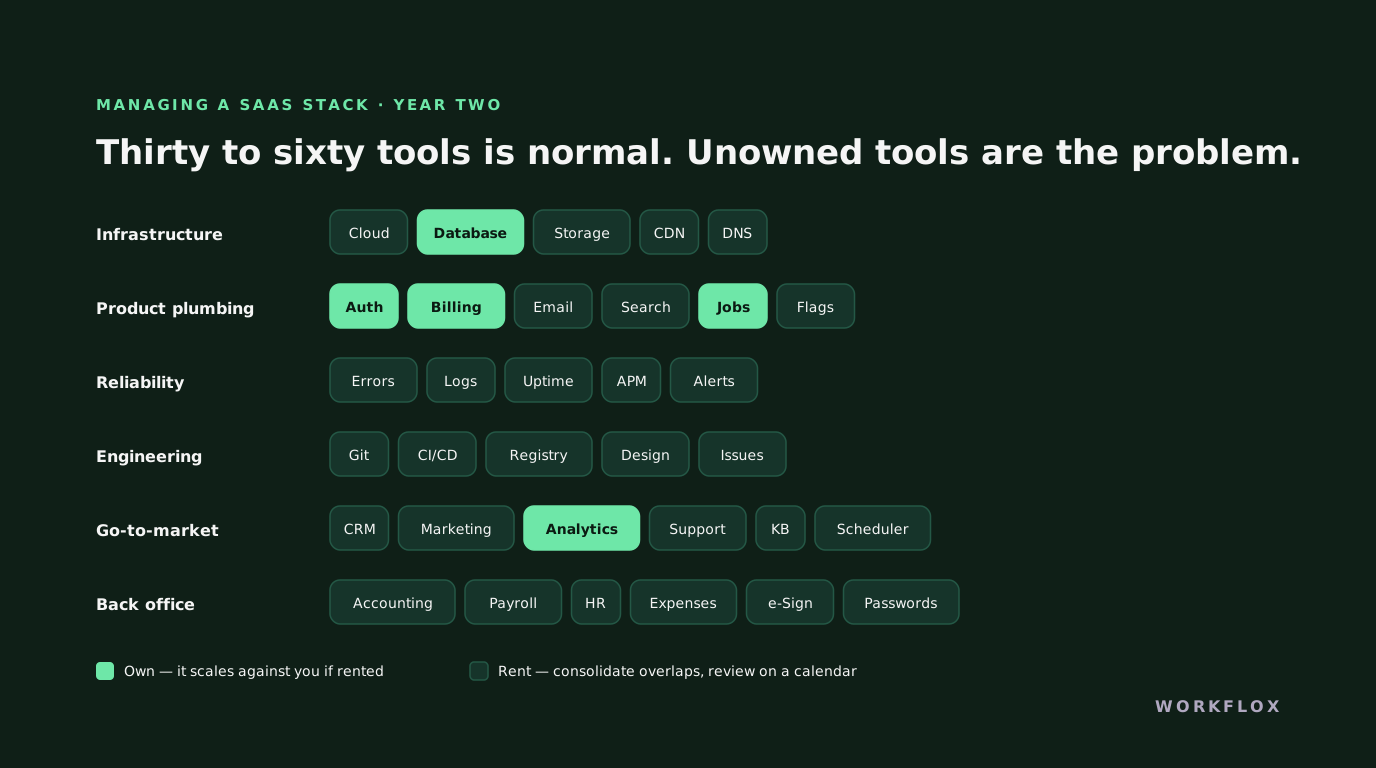
Table of Contents
Nobody plans their SaaS stack. It accretes, a tool for this, a trial that became a subscription, a platform the new hire insisted on, and by year two a company that started with five tools is running fifty, paying for sixty, and has no idea who owns half of them. This is how to manage a SaaS stack once it is real rather than aspirational.
What you will actually be running
By the second year of a real SaaS company the stack settles into layers:
Infrastructure. Cloud hosting, a database service, object storage, a CDN, DNS. Usually one provider plus a few edges.
Product plumbing. Authentication, billing and subscriptions, transactional email, file handling, search, background jobs, feature flags.
Reliability. Error tracking, logging, uptime monitoring, performance monitoring, incident alerting. Often four tools doing three jobs.
Engineering. Source control, CI/CD, a package registry, a design tool, an issue tracker.
Go-to-market. CRM, marketing automation, analytics, a support desk, a knowledge base, a scheduler, a video tool, a chat widget.
Back office. Accounting, payroll, an HR system, expense management, e-signature, a password manager.
Thirty to sixty tools is normal. The number is not the problem.
The four disciplines
Inventory with owners. One list: tool, cost, billing cadence, renewal date, owner, what it does. Half the value of managing a stack comes from writing it down, because a third of it will turn out to be duplicated, orphaned or unused.
Consolidate overlaps. Four monitoring tools doing three jobs. Two analytics platforms nobody reconciles. A chat widget and a support desk that do not talk. Consolidation is usually the fastest saving and the one that also reduces engineering friction.
Own what scales against you. Usage-priced tools are cheap at the start and quietly become the largest line on the bill. When a tool's monthly cost exceeds what an engineer would spend maintaining an alternative, the arithmetic has flipped. Our custom AI vs SaaS comparison covers the build-or-buy version of this decision, and it applies to more than AI.
Review on a calendar. Auto-renewals compound. A quarterly thirty-minute review of the inventory catches the trial that became a subscription and the tool the person who chose it took with them when they left.
Own versus rent
Rent commodity functions: payment processing, email delivery, monitoring, e-signature. The vendor is better at it than you and the price is proportionate. Own the product, its core data model, and any capability that has become a competitive one. Between those, decide by two tests. Does the pricing scale against your growth, and can this data leave your control? A yes to either is a signal to own it, and the engineering to do so is often smaller than the recurring bill.
Security is part of the stack
Every tool is a login, a data flow and a vendor to assess. Enterprise customers will ask which tools touch their data, and a SOC 2 process will want the same list. The inventory you built for cost is the one you will need for the questionnaire, build it once, properly. Our note on what enterprise buyers ask about SaaS security covers the review.
An inventory, done in an afternoon
The first time we run this with a client, the tool count surprises everyone. A fifty-person company in Riyadh estimated they used about twenty SaaS products. The finance export showed sixty-three, including four project management tools, three form builders and two password managers. Nobody had chosen that; each was a reasonable decision by one team at one moment. The inventory took an afternoon: export every subscription from the card statements and the accounts payable ledger, list the owner, the seat count, the renewal date and what it connects to. Then walk the list with each team lead. About a third of the tools were cancelled the same week, two of the duplicates were consolidated over the following quarter, and the remaining stack got an owner per tool. Annual saving was a little under $40,000, and the more important result was that someone now knew what the company was running.
Renewal calendar and the seat audit
Two habits keep the stack from drifting back. The renewal calendar lists every subscription by renewal date with a reminder thirty days ahead, so that the decision to keep, downgrade or cancel is made before the auto-renew rather than discovered after. Annual contracts deserve a sixty-day reminder, because negotiation takes time. The seat audit runs quarterly: for each tool, compare the seats paid for against the accounts that have logged in within the last month. The gap is almost always ten to twenty percent, and it is pure waste. Most vendors will adjust seat counts mid-contract downwards if asked, and nearly all will at renewal. This is unglamorous and it is where the money is.
Data flow, the part people skip
A tool is not just a cost; it is a place your data goes. For each tool in the inventory, note what data it holds, whether that includes customer or employee personal data, where the vendor stores it, and which other tools it syncs with. For companies in the Gulf or Europe this is a compliance question, because a form builder that stores submissions on a US server may put you in breach of a data residency rule you did not know applied. For everyone it is a security question, because a tool with an API key into your CRM is an attack path whether or not anyone still uses it. The data flow map is usually where the strongest case for cancelling a tool appears: not the cost, but the exposure.
Where custom fits, concretely
The own-versus-rent question above is easiest to answer with examples. A scheduling tool for a clinic: rent it, the workflow is standard. A quoting tool for a manufacturer with pricing rules that live in a fifteen-tab spreadsheet: build it, because no product will encode those rules and the spreadsheet is the company's actual competitive knowledge. A customer portal: rent if a standard one fits, build if the value is in showing customers data assembled from three internal systems. The pattern is that rented tools are right for processes that look like everyone else's, and custom is right for the few that do not. A small internal tool that replaces two or three subscriptions and encodes how the business actually works typically runs $9,500 to $25,000 with us, and it removes a seat cost that would otherwise recur forever.
The one-page stack policy
Write it once, and short. Who can buy a tool and above what amount does it need approval. That every tool has a named owner. That every purchase goes into the inventory with its renewal date. That single sign-on is used wherever the vendor offers it and that access is removed when someone leaves. That any tool holding customer data is reviewed for where that data lives. And that the inventory is walked once a quarter. This is not bureaucracy; it is the minimum that stops the sixty-three-tool situation from recurring. Companies that write it down keep the savings. Companies that rely on good intentions are back where they started within a year.
What this has to do with us
We build SaaS products, and the stack conversation is usually the second one we have with a founder, right after the product scope, because the choices made in month one about auth, billing and infrastructure are the ones that either scale cleanly or become the year-two migration project. If you are still deciding whether to build or outsource at all, our SaaS outsourcing guide covers that first.
Frequently Asked Questions
What is a SaaS stack?
The set of third-party tools a SaaS company runs its own business on: hosting and infrastructure, auth, billing, analytics, support, email, monitoring, CI/CD, plus the internal tools for sales, marketing and finance. By year two a typical company runs thirty to sixty of them, and the monthly total is frequently a second payroll nobody planned.
How do I reduce SaaS stack costs?
Inventory everything with an owner and a renewal date; consolidate overlapping tools; move the highest-volume usage-priced tools to flat or self-hosted alternatives where the engineering cost is lower than the bill; and review annually rather than letting auto-renewals compound. The largest single saving is usually one usage-priced tool that has quietly scaled with your growth.
Which parts of a SaaS stack should I own rather than rent?
Anything where usage pricing scales against your growth, anything holding data you cannot let leave your control, and anything that has become a competitive capability. Own the product and its core data; rent commodity functions, email delivery, payments, monitoring, until the bill or the risk says otherwise.
How many tools should a SaaS startup use?
As few as the stage requires. Pre-traction, a handful. By year two, thirty to sixty is normal and not a problem in itself. The problem is thirty to sixty with no owner, no inventory and no review. Manage the count by managing the process, not by a target number.