
GIS Case Study
Infrastructure Portfolio Dashboard — Project Management Dashboard
A geospatial dashboard for tracking, visualising and analysing an infrastructure project portfolio in real time.
Domain
Infrastructure / Project Portfolio Management
Role
Full-Stack GIS Developer
At A Glance
What Makes It Work
Every project geolocated on a province-level national map
Portfolio KPIs: total, ongoing, completed, managed and specialised projects
S-curve progress charts comparing planned against actual delivery
Project detail records with client, division, tasks, dates and status
A portfolio you can see
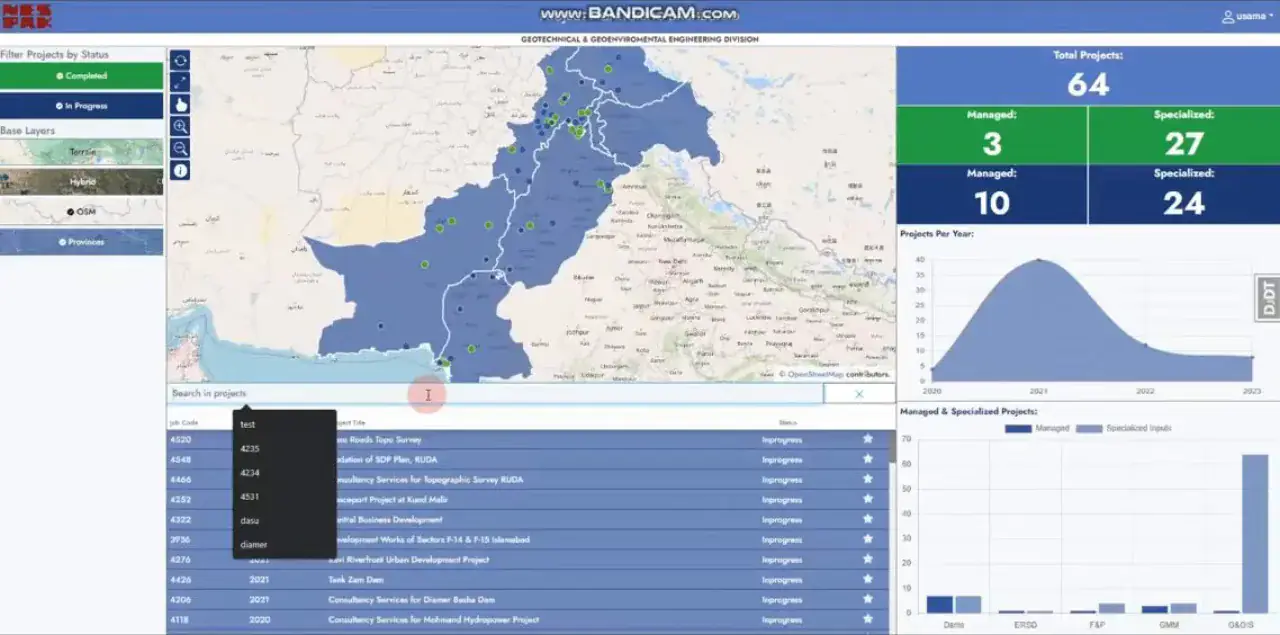
An organisation delivering infrastructure projects across a country was tracking them in project management tools that knew everything about a project except where it was. Portfolio reviews were spreadsheet exercises: totals, statuses and dates in columns, with the geography, which province, which district, how the work was distributed, reconstructed by hand for every presentation. Questions like where the delayed projects were clustered had no ready answer. The dashboard was built to give the portfolio a map. Every project is geolocated, KPIs summarise the portfolio at a glance, and the detail behind any marker is one click away. It is a management tool rather than a GIS tool, and the map is there because location turned out to be the dimension the existing tools were missing.
KPIs, a map, and the detail behind both
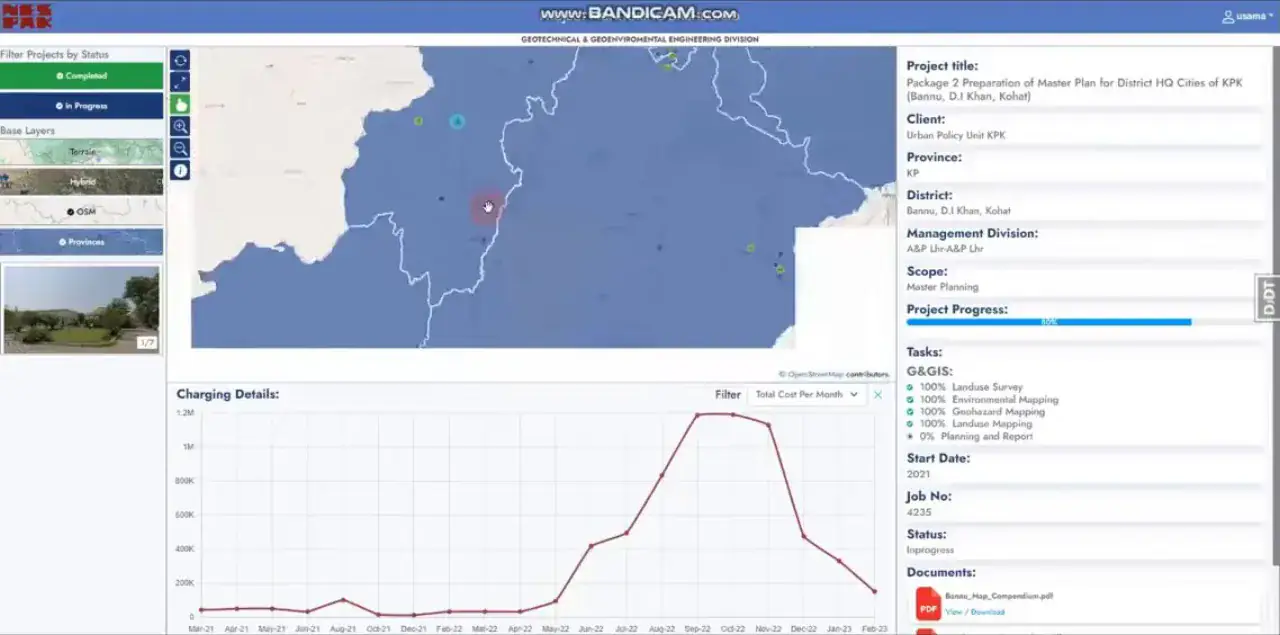
The platform is built on Django with Mapbox GL JS for mapping and GeoServer serving the administrative layers. KPI tiles across the top summarise the portfolio, total, ongoing, completed, managed and specialised categories, and update as project records change. The province and district map plots every project as a clickable marker, and the marker opens a detail panel with client, province, district, manager, division, tasks, dates and status. Progress is the part that management uses most. Each project carries a task list with start and end dates, scope and current status, a progress bar, and an S-curve chart comparing planned against actual delivery over time. Seeing the S-curves side by side across the portfolio is what makes a slipping project visible weeks before its end date would.
What management does with it
Portfolio reviews now start from the dashboard rather than a slide deck. The map answers the geographic questions directly, the KPIs answer the aggregate ones, and the S-curves surface the projects that need attention. Because it reads from the same project records the delivery teams maintain, it is current without anyone preparing it. The design choice that mattered was restraint on the GIS side. This is not a platform for spatial analysis; it is a portfolio view where the map is one lens among several. Keeping it that way, clean markers, administrative boundaries, no analysis toolbox, is why non-technical managers adopted it. That balance is one we weigh on every web application development project where a map is useful but not the point.
Capabilities
Core Functionality
KPI tiles summarising the portfolio at a glance
Province and district map with clickable project markers
Project detail panel: client, province, district, management division, job file
Task list with start date, end date, scope and current status
Progress bar and S-curve chart per project
Site photograph gallery attached to each project record
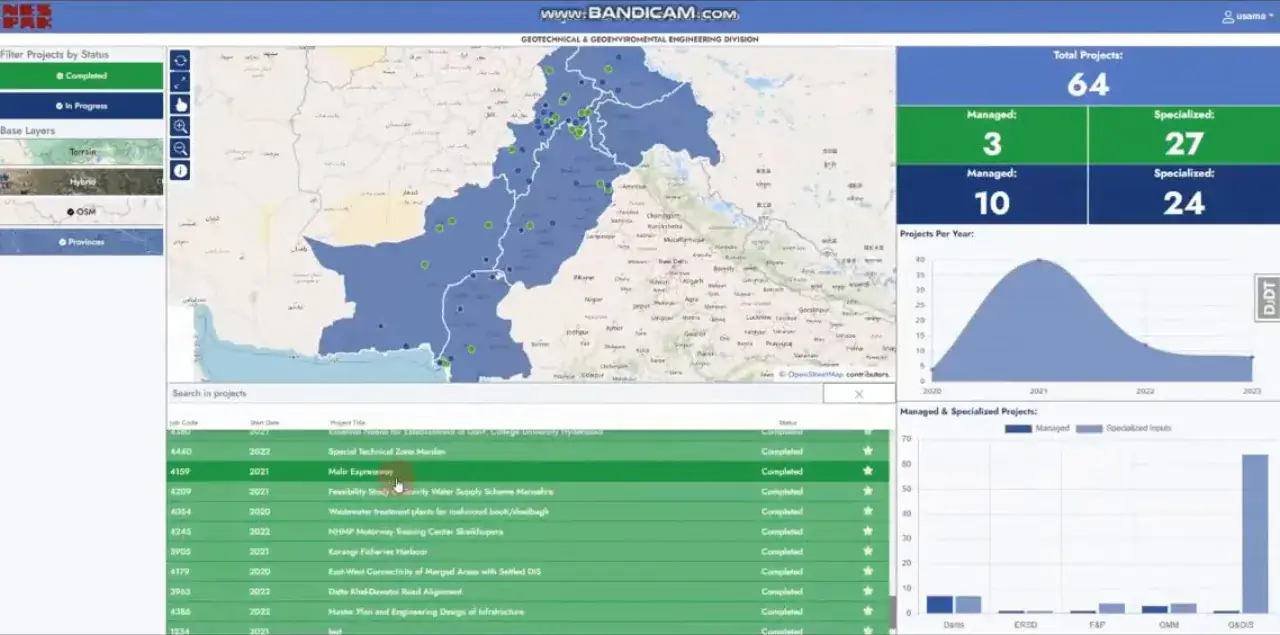
Sortable, filterable master project table with drill-down
Technologies
Tools & Stack
Product
From The Working Application
Questions
Frequently Asked Questions
Where does the project data come from?
From the organisation's own project records, which the delivery teams maintain. The dashboard reads those records and adds geolocation and visualisation on top, so it is current without a separate data-preparation step before each review.
What does the S-curve chart show?
Planned cumulative progress against actual cumulative progress over the life of a project. Comparing the two curves shows whether a project is ahead, on track or slipping, and viewing several projects' curves together surfaces the ones that need attention before their end dates.
Can we filter the portfolio by province or status?
Yes. The map and KPIs respond to filters on province, district, status, division and manager, so a regional review or a status-specific review is a filter rather than a new report.
Is this a GIS platform or a management dashboard?
A management dashboard with a map. It deliberately omits spatial analysis tools so that non-technical managers can use it without training. Where deeper geospatial analysis is needed we build it as a separate capability rather than complicating the portfolio view.
Contact Us
Have A Project?
Let’s Build ItHave a project in mind? Tell us what you're building and we'll get back to you within 12–24 hours with a clear plan.
🔒
100% Confidential
⚡
12–24 Hr Response
🛡️
60-Day Bug Fix
✅
Free Consultation
💬
Start Your Project
Fill in the details below or book a call