Cloud & DevOps
Cloud Migration Service Providers: How to Evaluate One Without Getting a Lift-and-Shift You Regret
By Rana Sami Ullah • August 2026
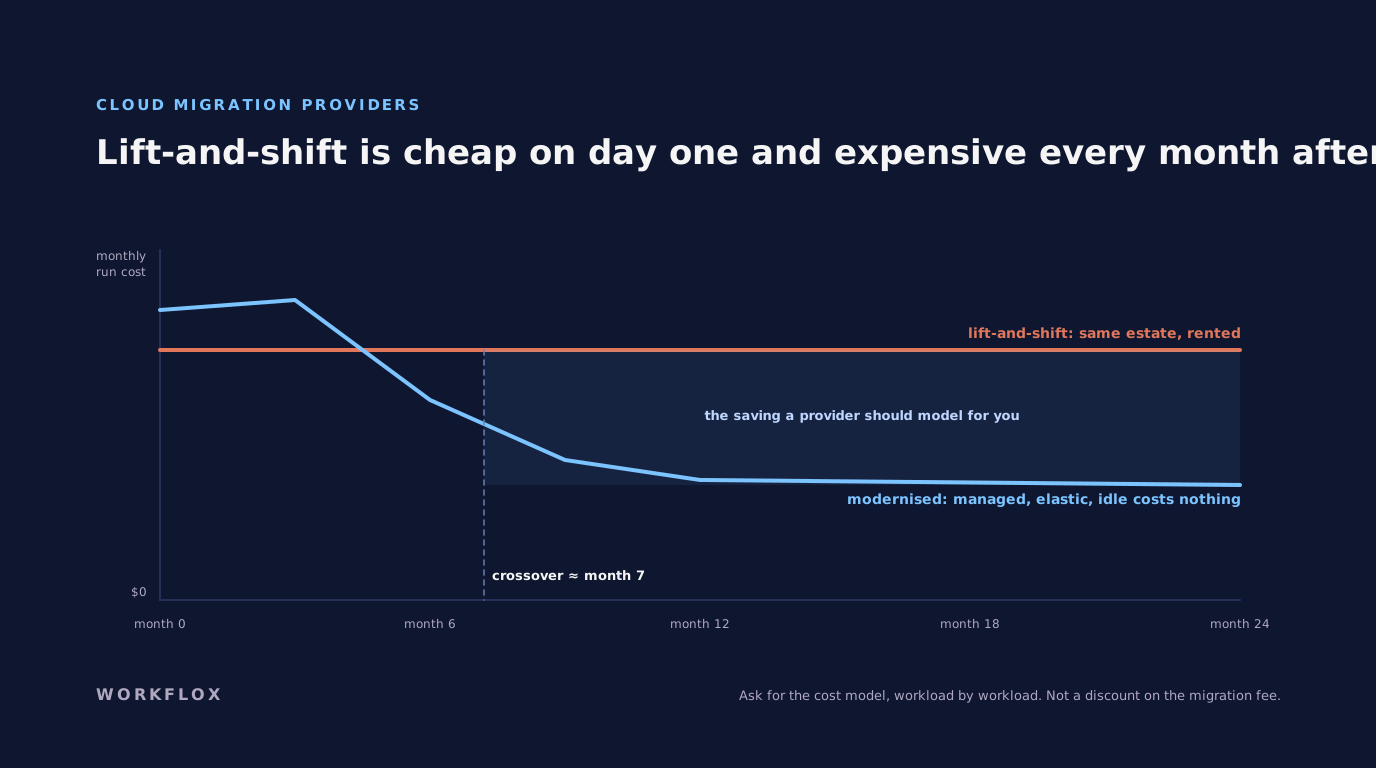
Table of Contents
The cloud migration service providers market has a specific failure mode: a fast, cheap lift-and-shift that leaves you with the same estate you had, on rented servers, at a higher monthly cost. It is common enough that evaluating a provider is mostly about detecting it in advance.
Lift-and-shift versus modernisation
Lift-and-shift recreates your servers in the cloud as they are. It is fast and low-risk, and it frequently costs more to run than what you left, because virtual machines sized for peak and running around the clock are the most expensive way to use a cloud.
Modernisation re-architects onto managed databases, containers, serverless functions and object storage. Services that scale with use and cost nothing when idle. It costs more upfront and less every month after.
Most honest migrations mix the two: lift what must move now, modernise what pays back. A provider whose plan is all lift is selling speed at your expense; one whose plan is all modernise is selling a rewrite you may not need.
Questions that detect the failure mode
Show me the cost model. Current spend against the projected cloud bill under their plan, by workload. Not a discount on the migration fee, the run cost afterwards.
How is downtime minimised, and how does rollback work? A cutover plan with a rehearsal, a data-sync approach that keeps the old system live until the new one is verified, and a documented way back if verification fails.
How is data moved, validated and reconciled? Volume, method, and the checks that prove nothing was lost or corrupted.
Who owns the cloud accounts afterwards? You. A provider that holds the accounts holds the estate.
What did the last migration cost to run six months later? The provider's own reference should be able to answer.
What modernisation actually changes
Managed databases that patch and back themselves up. Containers that scale horizontally behind a load balancer. Serverless for the intermittent workloads that were running on always-on servers. Object storage for the files sitting on expensive disks. Infrastructure as code so the estate is reproducible. Monitoring that alerts before users do. Our DevOps and cloud practice builds this, and data modernisation, moving a legacy warehouse onto a cloud platform, usually runs alongside it through our data engineering work.
The cost model, worked through
Here is what the model we ask providers for looks like in practice. A mid-sized company runs twelve applications on around forty virtual machines in a colocation facility. Lift-and-shift puts those forty machines in the cloud at similar sizes, running around the clock, and the monthly bill comes in higher than the colocation contract, which surprises everyone except the provider who quoted it. The modernised version looks different. Four of the applications move to managed container services and scale to zero overnight. The databases move to managed instances that patch themselves. Two batch workloads become serverless functions that run for minutes a day. The file server becomes object storage. The remaining machines are right-sized from actual utilisation rather than the sizes someone chose years ago. On that shape the monthly bill lands well under the colocation cost, and it took a fortnight longer to migrate. That fortnight is what the cost model is for.
What a rehearsed cutover involves
A provider who says the cutover will be fine is describing hope. A provider who describes the rehearsal is describing a plan. Ours has a fixed shape. Data is synced continuously from the old environment to the new one for days before the switch, so the final cutover moves minutes of changes rather than hours. The new environment runs the full application against a copy of production data, with the reconciliation checks that prove nothing was lost: row counts, totals, a sample of records compared field by field. The DNS or load balancer switch is timed for the quietest hour, with the old environment left running and reachable. Then a defined window, usually 48 hours, during which rollback is a single action. Only after that window is the old environment decommissioned. If a provider cannot walk you through those steps for your specific applications, ask for a different provider.
Reading the proposal
Three things in a migration proposal tell you what kind of engagement it will be. The first is whether run costs appear at all. If the proposal prices only the migration fee, the provider has not modelled what you will pay every month afterwards, and that number will be your problem. The second is how integrations and dependencies are handled. Every application talks to something else, and a proposal that lists applications but not the connections between them will discover those connections during the cutover. The third is who owns the cloud accounts, the infrastructure code and the credentials when the work is done. The answer is you, from the start, in writing. A migration where the provider holds the accounts is not a migration. It is a hosting contract with extra steps.
After the migration
The month after cutover is when the provider's real value shows, and it is the month most contracts forget. Bills arrive that do not match the model, usually because something was left running or sized for the old world. Monitoring that worked in the data centre turns out to have gaps in the cloud. A backup job that nobody tested restores nothing. A good engagement includes a defined period, typically thirty to sixty days, during which the provider reviews the first bills against the model, tunes sizes and schedules, tests a restore from backup, and hands over runbooks your team can follow without them. Ask for that period in the proposal and ask what it costs. A provider who says the migration ends at cutover is describing when their responsibility ends, not when yours begins.
The question providers hope you will not ask
Which of our applications should not move at all? A good provider will name at least one. Some workloads are cheaper where they are: a stable, predictable system on hardware that is paid for, with no scaling need and no security review forcing a change, can cost more in the cloud every month for no benefit. A provider whose answer is that everything should move is selling migration hours, not advice. The best migration plans we have seen leave one or two systems behind, migrate the ones with a clear reason, modernise the ones that pay back, and set a date to revisit the rest. That is less exciting than a full transformation programme. It is also what saves money.
A last check before signing
Read the proposal once more for four words: assess, migrate, modernise, operate. A good one separates them, prices them separately, and tells you which of your systems falls into each. A weak one blurs them into a programme with a single large number and a timeline. Ask which systems will not move, ask what the bill looks like in month six, ask who on your side will own the result, and ask for a reference whose migration finished more than a year ago. If those four questions get clear answers, sign. If they get a slide, keep looking.
What it costs
A single-application migration typically runs $10,000 to $28,000. A multi-application estate with data migration and selective modernisation $25,000 to $62,000. Enterprise estates with re-architecture scale beyond that. We quote fixed price against a written plan that includes the run-cost model, because a migration fee that looks cheap and a cloud bill that is not is the outcome this whole article is about avoiding. For US clients we work EST and PST hours and host in US regions with the documentation an enterprise security review expects.
Frequently Asked Questions
What do cloud migration service providers do?
Move applications, data and infrastructure from on-premise or one cloud to another, and, in the good cases, modernise what is moved so it costs less and runs better afterwards. The range is wide: from a lift-and-shift that recreates the old estate on rented servers to a re-architecture onto managed and serverless services.
What is the difference between lift-and-shift and modernisation?
Lift-and-shift recreates your servers in the cloud as they are: fast, low-risk, and often more expensive to run than before because nothing was optimised. Modernisation re-architects onto managed databases, containers or serverless, which costs more upfront and less every month after. Most real migrations mix the two: lift what must move now, modernise what pays back.
How do I evaluate a cloud migration provider?
Ask for a cost model comparing your current spend with the projected cloud bill under their plan, not a discount on services. Ask how downtime is minimised and how rollback works if a cutover fails. Ask how data is moved, validated and reconciled. Ask who owns the cloud accounts afterwards. And ask for a reference from a migration completed a year ago.
How much do cloud migration services cost in the USA?
A single-application migration typically runs $10,000 to $28,000. A multi-application estate with data migration and some modernisation $25,000 to $62,000. Enterprise estates with re-architecture scale beyond that. Beware providers whose fee is low but whose plan leaves you with a cloud bill higher than the servers you left.
Related services
Related Articles