
Product Engineering
From No Code MVP to Mobile App in One Day, A Practical Workflow
By Rana Sami Ullah • January 2026
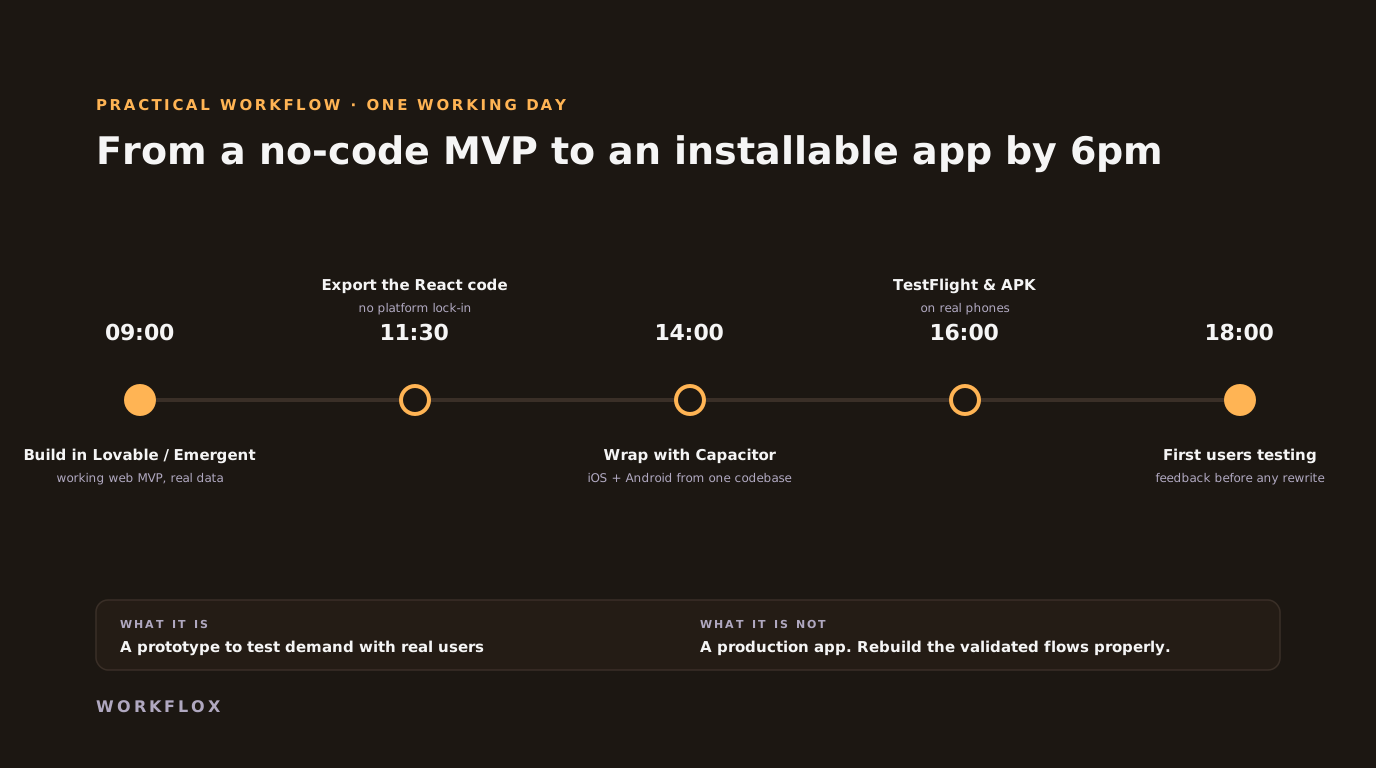
Table of Contents
- Why build a no-code MVP first
- The one-day workflow
- Why Capacitor makes the mobile step cheap
- A day, hour by hour
- What the exported code is like
- The Capacitor step, in detail
- When to rebuild, and what it costs
- The mistake to avoid
- Choosing between the tools
- What to measure on day two
- Where this works, and where it does not
No code platforms have matured beyond simple prototypes. Tools like Lovable and Emergent can help teams build functional MVPs in a single day, not mockups, but working products.
Why build a no-code MVP first
The real value is validation. You can test an idea with real users without committing weeks of engineering time.
Modern no code tools can generate structured React applications. That means you are not locked into a platform. You can export the code and take ownership.
The one-day workflow
A practical workflow looks like this:
- Build the MVP using Lovable or Emergent
- Validate core flows with real users
- Export the React codebase
- Refactor components and clean the logic
- Add Capacitor
- Ship to iOS and Android
Why Capacitor makes the mobile step cheap
Capacitor allows the same React app to run as a native mobile app, while still giving access to native features like storage, notifications, and deep links.
A day, hour by hour
We ran this with a founder who wanted to test whether gym owners would pay for a simple class-booking tool. The first two hours went into Lovable: a landing page, a class list, a booking form and a confirmation screen, backed by a hosted database the tool provisioned. Hour three was prompting the tool through the rough edges: time zones, a booking limit per class, a cancellation. Hours four and five were export, a look at the generated React, and a tidy of the component structure so it could be worked on later. Hour six was Capacitor: install, configure, add the app icon and splash screen, build for iOS and Android. Hour seven was TestFlight and an internal testing track on Google Play. By the evening, three gym owners had the app on their phones. Two of them booked test classes. One asked what it cost.
What the exported code is like
Honest answer: it is usable and it is not what an engineer would write. Components are large, state is handled in whatever way the tool chose that day, styling is inline or utility classes with little system, and the data layer is the tool's hosted backend with its own authentication. That is fine for validation. It is not fine for a product with paying users, and the moment to decide is when the validation succeeds. The tidy in hour four is not an attempt to fix this. It is enough to keep the code readable so that the rebuild, when it comes, can use the prototype as a working specification rather than a mystery.
The Capacitor step, in detail
Capacitor wraps the React build in a native shell and exposes device features through plugins. For a validation app, the ones that matter are push notifications, so users come back, and secure storage for the session. Deep links, so a shared class link opens the app. And the app icon and splash screen, which are what make it feel like an app rather than a website in a frame. Each is an hour or less. Store review is the slow part: Apple can take a day or more, and a first submission often gets a question about the app's purpose. Google's internal testing track is immediate. Plan to have the app on testers' phones the same day through TestFlight and the Play internal track, and in the public stores later in the week.
When to rebuild, and what it costs
The signals are the same every time: users are paying or returning, the tool's hosted backend is becoming a constraint, a feature needs offline support, performance is visibly poor, or a customer asks a security question the tool cannot answer. At that point the validated flows are rebuilt, usually in React Native with a backend the company owns, and the prototype serves as the specification, which shortens the scoping to almost nothing. A rebuild of a validated MVP of this size runs $9,500 to $25,000 with us and takes six to ten weeks. The no-code day cost a subscription and a founder's Saturday, and it is the reason the rebuild is scoped correctly.
The mistake to avoid
The failure mode is not the no-code tool. It is keeping the no-code build too long, adding features to it, and letting the first real customers run on a backend the company does not control. The one-day workflow is for finding out whether to build. Once the answer is yes, build. Founders who treat the prototype as version one spend the next year paying for the shortcuts, and the ones who treat it as a test spend the next year on the product.
Choosing between the tools
Lovable and Emergent produce React with a hosted backend and are the fastest path to a working web app that can be exported. Bolt and v0 are similar with different strengths in UI generation. FlutterFlow produces Flutter and skips the Capacitor step, at the cost of a less exportable codebase. For a one-day validation, pick the tool that exports code you could read, because that export is what keeps the option to rebuild open. Tools that keep the app inside their platform are fine for internal tools and wrong for anything that might become a product.
What to measure on day two
The app exists. Now the question it was built to answer. Did the testers complete the core flow without help? Did any of them come back the next day? Did anyone ask what it costs, or better, offer to pay? Those three questions, asked of ten people, tell you more than a survey of a thousand. Write the answers down before deciding anything, because the temptation after a successful build day is to keep building. The prototype's job is to produce those three answers, and it has done its job whether they are yes or no.
Where this works, and where it does not
This approach works best for startup MVPs, internal tools, and early stage SaaS products. The key is planning. No code should accelerate delivery, not create technical debt.
When teams design with export and scalability in mind, they avoid costly rewrites later. No code does not replace engineering. It helps teams reach real users faster, then invest deeper after traction.
Frequently Asked Questions
Can a no-code MVP really become a mobile app in a day?
For a validation build, yes. Tools such as Lovable and Emergent generate a structured React application, which can be wrapped with Capacitor into an iOS and Android app the same day. It is a prototype for testing demand, not a production app, and the article is honest about that line.
What is Capacitor and why use it here?
Capacitor packages a web application as a native app with access to device features such as camera and push notifications. Because the no-code tool exports real React code, Capacitor can wrap it without a rewrite, which is what makes the one-day timeline possible.
When do we move from the no-code build to a proper app?
When users are paying or engagement is proven and the limits show: performance, offline needs, complex data or security requirements. At that point the validated flows are rebuilt properly, usually in React Native, with the no-code version serving as the specification.
Related Articles


