Automation
Why n8n Is Becoming Essential for Modern Web and Mobile Apps
By Rana Sami Ullah • January 2026
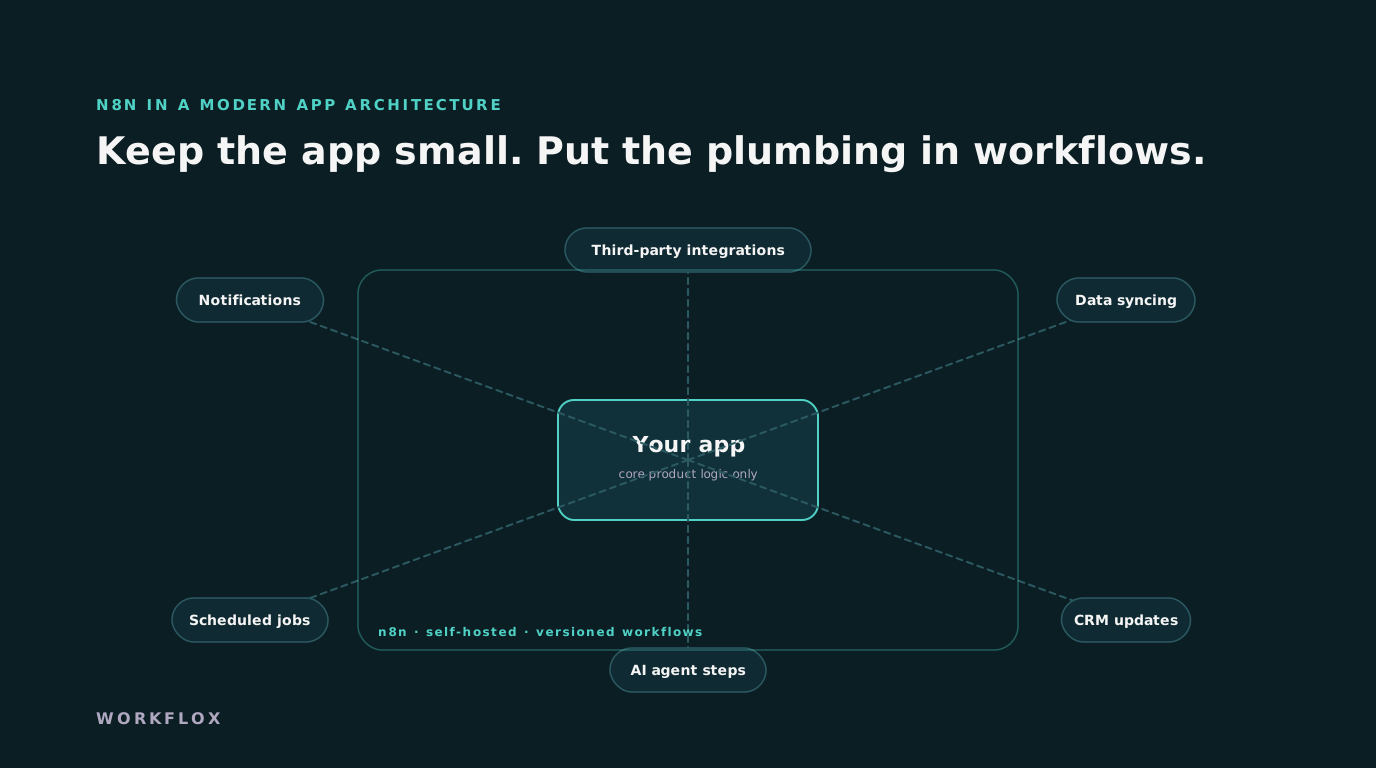
Table of Contents
- Automation as a separate layer
- What teams move into n8n first
- Self-hosting and ownership
- A concrete split, from a real product
- What belongs in the app and what does not
- Running it properly
- Where it does not fit
- Cost and a first move
- Testing and versioning workflows
- How the mobile app benefits specifically
- A note on ownership
- Where n8n stops
Modern applications rely heavily on automation. Notifications, data syncing, scheduled jobs, CRM updates, third party integrations. When this logic lives entirely inside the app, complexity grows fast.
Automation as a separate layer
n8n offers a different approach. Instead of hard coding automation logic into your core backend, you define workflows visually while keeping control over the logic.
What teams move into n8n first
Common use cases include:
- Triggering actions when users sign up
- Syncing data between tools
- Sending notifications and emails
- Running scheduled background jobs
- Automating reports and dashboards
For web and mobile teams, n8n becomes an external automation layer. Logic that does not belong inside UI or the main backend can live independently. This keeps your product code cleaner and easier to maintain.
Self-hosting and ownership
One major advantage is ownership. n8n can be self hosted, which gives teams control over data, cost, and security. This matters for products handling sensitive data.
Teams adopting n8n often see faster iteration on workflows, reduced backend complexity, and easier debugging because flows are visible.
A concrete split, from a real product
A subscription app we maintain had, in its backend, code for sending welcome emails, syncing new users to the CRM, posting to a Slack channel on every upgrade, generating a weekly usage report and retrying failed webhook deliveries from the payment provider. None of it was the product. All of it broke in ways that took engineers off product work, and every change to it needed a release. We moved it into n8n over two weeks. The backend now emits events, sign-up, upgrade, payment failed, and the workflows do the rest. The backend lost about four thousand lines. A marketing change to the welcome sequence is now a workflow edit, reviewed and deployed in an hour, with no app release.
What belongs in the app and what does not
The rule we use: if the logic decides what the product does, it stays in the backend. If it decides what happens around the product, it moves to the workflow layer. Authorisation, billing rules, the core data model and anything latency-sensitive stay in code. Notifications, CRM and analytics syncs, scheduled reports, third-party integrations and internal alerts move out. The boundary is the event. The backend publishes what happened, with enough detail, and does not care who listens. That discipline keeps the app testable and the workflows changeable by people who are not backend engineers.
Running it properly
A workflow layer that only one engineer understands, on a server nobody dares restart, is not better than the code it replaced. The instance runs in your own cloud account with single sign-on, credentials in the platform vault rather than in nodes, workflows exported to version control so changes are reviewed and reversible, alerts to a named person on failure, and backups that have been restored at least once. This is two or three days of setup and a few hours a month after. Mobile and web teams that do it treat the workflow layer as part of the product. Teams that skip it end up with a second, less visible backend.
Where it does not fit
High-throughput event processing, thousands of events a second, wants a purpose-built stream processor. Anything that must respond in under a hundred milliseconds belongs in code. Complex branching business logic becomes hard to read as a diagram beyond a certain size, and at that point it should be a service that the workflow calls. And workflows are not a substitute for tests: each one needs a test run against sample data before it goes live, the same as any code. n8n earns its place as the layer for the glue, and it loses it when it is asked to be the whole application.
Cost and a first move
Setting up an instance properly and moving the first two or three integrations out of an app runs $4,000 to $10,000 with us and takes two to three weeks. Hosting is a few dollars to a few tens of dollars a month. The first move for most teams is the same: list every piece of backend code that talks to a third-party service or sends a message, and ask which of it decides what the product does. The rest is the first workflow.
Testing and versioning workflows
A workflow is code with a different syntax, and it needs the same discipline. Each one is exported as JSON into the product's repository, so a change shows up as a diff in review and can be rolled back. Each has a sample payload saved alongside it and is run against that payload before it goes live, in a staging instance that mirrors production with test credentials. Secrets never appear in the export. And a workflow that calls the app's API uses a service account with the narrowest permission that works. Teams that skip this treat the workflow layer as a place where anything goes, and within a year it is the part of the system nobody understands.
How the mobile app benefits specifically
Mobile releases are slow: a store review, a staged rollout, and users who update when they feel like it. Anything that lives in the app is stuck for weeks. Moving notification logic, onboarding sequences and integrations into the workflow layer means those can change the same afternoon, for every user, without a release. A push notification's timing, the content of a welcome sequence, or which CRM a sign-up goes to are workflow edits. The app publishes the event and does not know or care what happens next. For a mobile team shipping every two or three weeks, that is the strongest argument for the separation.
A note on ownership
The workflows, the instance and the credentials sit in the company's own account. If we stop working together, nothing stops running, and the runbook lets the next engineer pick it up. That is the arrangement we insist on, and it is the one to insist on with anyone. Ask for it in writing before the first workflow is built, because it is far harder to negotiate after the platform is running the business.
Where n8n stops
n8n does not remove the need for engineering. It removes repetitive glue work. As products scale, separating automation from core logic becomes a practical requirement.
Frequently Asked Questions
What is n8n used for in a web or mobile app?
Automation that does not belong in the core codebase: notifications, data syncing between services, scheduled jobs, CRM updates and third-party integrations. Workflows are defined visually, versioned, and run on your own server, so the app stays simpler and the logic stays visible.
Is n8n better than writing the automation in the backend?
For integration and orchestration logic that changes often, yes: it is faster to modify, easier for non-engineers to read, and isolated from the app's release cycle. Core business rules and anything performance-critical still belong in the backend.
Does self-hosting n8n cost much to run?
A single small server handles most application workloads, so the hosting cost is typically a few dollars to a few tens of dollars a month, with no per-task fees. Maintenance is updates, backups and monitoring, which take a few hours a month.