AI Technology
Claude vs OpenAI vs Gemini: Which to Use for Your App
By Rana Sami Ullah • April 2026
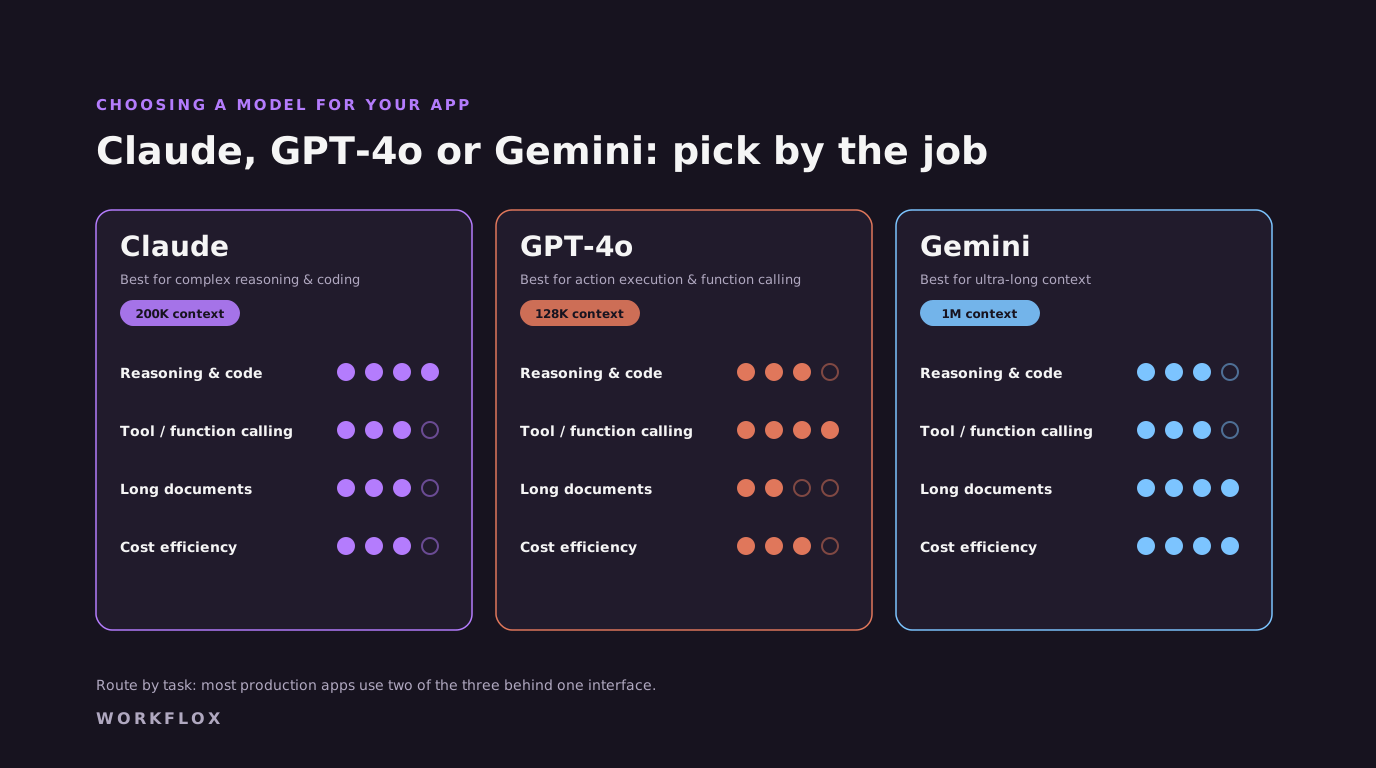
Table of Contents
Choosing a language model is one of the earlier decisions in a product, and one of the easier ones to change later if the code is written for it. The main choice in 2026 is between Anthropic's Claude, OpenAI's GPT-6 family and Google's Gemini, and the honest answer depends on the task, not on a leaderboard.
Model names and prices move every few months. The figures below are from each provider's own pricing page in September 2026, and you should check them again before you commit to a budget.
1. Anthropic Claude
Anthropic sells the Claude family in tiers. Claude Fable 5.1 is the top tier at $10 per million input tokens and $50 per million output tokens. Claude Opus 5.5 costs $4 and $20, Claude Sonnet 5.5 costs $2 and $10, and Claude Haiku 4.5 costs $1 and $5. Current Claude models include a 1-million-token context window at standard pricing, which suits long contracts, large codebases and multi-step agents that carry a lot of state. Claude is also offered through Amazon Bedrock and Google Cloud, which matters when procurement wants an existing cloud contract.
2. OpenAI GPT-6
OpenAI's line-up runs from GPT-6 Astra ($10 input and $50 output per million tokens for prompts up to about 272K tokens) through GPT-6.1 Sol ($2 and $10) to GPT-6 Luna ($0.10 and $0.50). OpenAI has the widest third-party ecosystem, mature structured outputs and function calling, and Azure availability for teams already on Microsoft. Luna-class pricing is hard to beat for high-volume classification and extraction.
3. Google Gemini
Gemini 3.1 Pro is listed at $2 input and $12 output per million tokens, and the Flash models are cheaper still. Gemini fits teams already in Google Workspace and Google Cloud, and its models handle images, audio and video natively, which helps with media-heavy inputs.
To see how we integrate these models, review our AI agent development services and our custom web app development configurations.\n\n## How we actually choose, on a real project\n\nWe rarely choose one. The process is the same each time. Write down the task types the product has: classification, extraction, drafting, long-document synthesis, tool calls. Assemble fifty to two hundred real examples per task type with the expected output. Run each candidate model against each set and score it. Then look at cost and latency per task, because a model that scores three points higher and costs eight times more is the wrong choice for a task that runs ten thousand times a day. The routing that comes out of this usually sends the high-volume simple tasks to a small model and reserves the frontier models for the tasks where the score difference is visible to users.\n\n## The things the benchmarks do not tell you\n\nPublished benchmarks measure the tasks the benchmark authors chose, on English text, with clean inputs. Your product's inputs are messy, often multilingual, and specific to your domain. A model that leads a leaderboard can trail on your invoices. Arabic handling varies more between models than English handling does, and it varies between formal and dialect. Instruction-following under long system prompts varies. Behaviour on refusals varies, and a model that declines a legitimate request in your domain is a support ticket. The only benchmark that predicts your product's behaviour is the one built from your product's data.\n\n## Write the code so the choice can change\n\nEvery model provider ships new versions on their own schedule, and the leader in any category changes within months. So the model choice should be a configuration, not an architecture. Put every model call behind one interface of your own. Store prompts in version control with their evaluation scores. Pin to dated model versions rather than floating aliases, so updates happen when you decide. Log which model and version produced each output. Then switching or adding a model is a branch, an evaluation run and a config change, rather than a rewrite. The products that got stuck on a 2024 model did not plan for this.\n\n## Cost, latency and the routing table\n\nFor most products, one routing table does most of the work. Intent detection, language detection, simple extraction and yes-or-no decisions go to the smallest model that passes the evaluation set. Multi-step reasoning, long synthesis and customer-facing drafting go to a frontier model. Anything over a length threshold skips the small model. Anything that fails validation on the small model retries once on the large one. With that in place, we typically see model costs come down by half to two thirds compared with sending everything to the most capable model, with no change users notice. The table lives in configuration and is revisited each time a new model version ships.\n\n## Data handling differs, and it matters\n\nWhere a request goes and what the provider keeps differs by provider, by plan and by region, and it changes. For products handling personal data in the Gulf or Europe, this is often the deciding factor rather than capability. Check which providers offer endpoints in an acceptable region, what their retention terms are on the plan you will use, and whether an open-weight model run in your own region is required for some data classes. We have built products where the routing sends sensitive requests to a self-hosted model and everything else to a hosted frontier model, and that split is becoming common.\n\n## Summary\n\nFor most projects, we recommend a hybrid model: Claude for reasoning-heavy tasks, and GPT-6 for speed and API tool calls. \n\nWant to benchmark models for your project? Get a free architectural audit from us.
Frequently Asked Questions
Claude vs ChatGPT vs Gemini: which AI model is best for building apps in 2026?
There is no single winner. Claude suits long documents, large codebases and agents that need a lot of context, and it offers a 1-million-token window at standard pricing. OpenAI GPT-6 has the broadest ecosystem, mature structured outputs and function calling, and very cheap small models. Gemini fits Google Workspace teams and media-heavy inputs. Most production apps route different tasks to different models, so the practical answer is to write the code so the choice can change.
Is Claude better than ChatGPT for coding tasks?
It depends on the codebase and the task, and the answer changes with each release. Public benchmarks measure narrow tasks, so we run each candidate on a sample of the client's own code and tickets and compare the results. For agentic coding tools that read a large repository, context size and tool-use reliability matter as much as raw quality, and both Claude and GPT-6 are strong there.
Which AI model should I use for an app that needs to read long documents?
Current Claude models and Gemini both handle very large context windows (Claude offers 1 million tokens at standard pricing), and OpenAI's GPT-6 models price prompts differently above about 272K tokens. Long context is not the same as good retrieval, though. For most document-heavy products we still retrieve the relevant passages first and send only those, which is cheaper and easier to audit than pasting everything into one prompt.
Can I use multiple AI models in the same app?
Yes, and most production apps should. Simple, high-volume tasks such as classification and extraction go to a small, cheap model like GPT-6 Luna or Claude Haiku. Reasoning-heavy or customer-facing tasks go to a stronger model such as Claude Sonnet 5.5 or GPT-6.1 Sol. WORKFLOX builds a model-agnostic routing layer so each task type uses the cheapest model that passes its evaluation set, which usually cuts model spend substantially without users noticing.
How does WORKFLOX choose which AI model to use for a client project?
We start with a requirements audit: task complexity, response time requirements, context length needs, data privacy constraints, and budget. From there we recommend a model strategy, single-model or multi-model, and build a model-agnostic abstraction layer so you can swap or add models as the market evolves. You are never locked into a single AI provider.
Related services
Related Articles