AI Technology
AI Business Process Automation: Where It Pays, Where It Doesn't, and the Challenges Nobody Quotes
By Rana Sami Ullah • August 2026
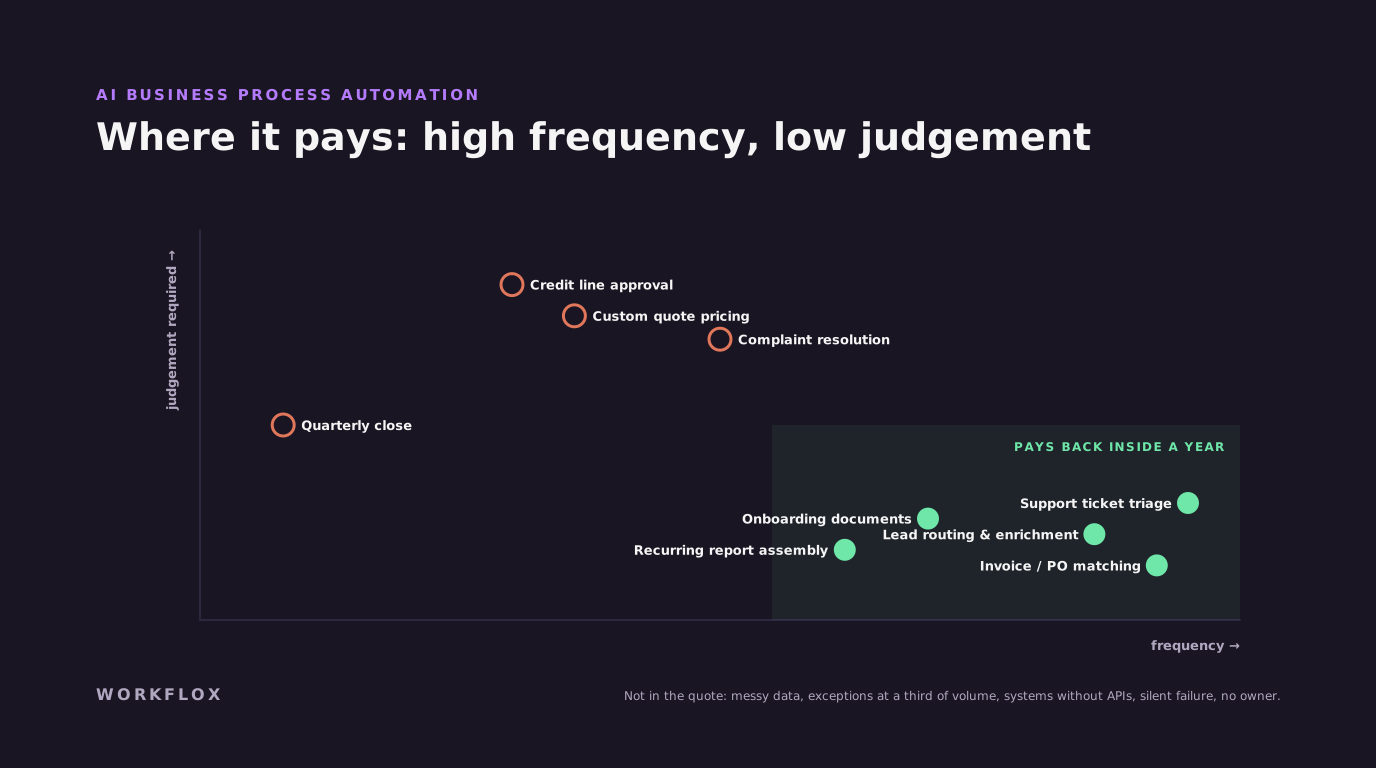
Table of Contents
AI business process automation is sold on the processes it can touch and bought on the ones it actually pays back. The gap between those two lists is where budgets go. This is how to tell which side of it a process sits on, and the challenges that are rarely in the quote.
Where it pays
The processes worth automating share a shape: high frequency, rule-heavy, low judgement, and currently done by someone moving information between two systems. Five come up more than any others, and all five have clear before-and-after numbers.
Invoice and purchase-order matching. Documents arrive as PDFs and scans; someone retypes and reconciles them. An AI extraction step plus validation against the order plus a review queue for low-confidence items pays for itself in the first month.
Inbound lead routing and enrichment. Capture from web, WhatsApp and email, score, enrich, assign in the CRM within seconds. Our real estate CRM automation work is one worked example.
Onboarding document collection. Chase, receive, classify, verify, file. Tedious for humans, well-suited to a bot with a human boundary on anything unusual.
Support ticket triage. Classify, route, draft a first response, escalate what needs a person.
Recurring report assembly. Pull from several systems, reconcile, format, distribute.
Where it disappoints
Processes whose real cost is the decision rather than the data movement. Approving a credit line, pricing a custom quote, resolving a complaint. An automation here produces faster wrong answers; what the process needed was a human with better information, which is a different project. And processes that run four times a year, the setup cost never amortises.
The challenges nobody quotes
Data is messier than the pilot. The pilot used clean examples. Production sends the scanned fax. Budget for extraction accuracy measured on a real sample, not a demo.
Exceptions are a third of the volume. Every process has a happy path and a long tail. If the automation handles only the happy path, a third of the work still lands on a person, with less context than before. Design the exception queue as a first-class part of the system.
Integrations to systems without APIs. The ERP from 2009 does not have a webhook. Screen automation is brittle; a controlled integration layer is real work. Estimate it.
Silent failure. An automation that fails quietly is worse than none, because people stop checking. Every workflow needs logging, retry, alerting and a manual fallback.
No owner. When the vendor leaves, who owns it? Name that person before the build starts.
A first automation, start to finish
A property management company in Dubai spent roughly two person-days a week matching supplier invoices to work orders. Invoices arrived as PDFs and photos on WhatsApp; someone typed the details into the accounting system and checked them against the maintenance log. We built a workflow that reads each invoice, extracts the supplier, amount, date and the property it relates to, matches it to an open work order, and posts it to the accounting system if everything agrees. About one invoice in six does not match cleanly: a rounding difference, a missing work order number, a supplier name spelled three ways. Those go to a review queue with the extracted fields and the candidate matches shown side by side, and a person resolves them in seconds rather than minutes. The two person-days became about three hours, most of it in the review queue. Build time was three weeks. It paid for itself in the second month.
Measuring before and after
The measurement is what separates automation that survives budget review from automation that quietly gets switched off. Before the build, record three numbers for the process: how many items it handles per week, how long each takes on average, and how often the output is wrong or late. Do this for two or three weeks rather than asking someone to estimate, because estimates are always low. After launch, record the same three, plus a fourth: the share of items that landed in the review queue. That last number is the honest measure of how much of the work the automation actually does, and it is the one to improve in the second iteration. A workflow that handles seventy percent of volume automatically and routes the rest to a person cleanly is a success. One that claims a hundred percent is not measuring.
Where people fit
Automation that removes a person from the loop entirely is rarer than the marketing suggests, and usually not the goal. The goal is to move the person from doing every item to handling the exceptions and owning the outcome. That changes the job, and it is worth saying so early, because the person whose work is being automated is also the person who knows where the process breaks. In the invoice example, the accounts clerk designed the review queue, decided what counted as a clean match, and now spends the time she saved chasing suppliers for missing paperwork, which the company had never had capacity to do. Involve that person from the scoping session. They will find the exception cases faster than any engineer, and they will decide whether the automation is used.
Tooling, briefly
The tools matter less than the process, but the choice still has consequences. For workflows that mostly move data between systems with a few AI steps, self-hosted n8n gives you unlimited runs for a fixed hosting cost and keeps the data in your region, which matters for clients in the Gulf and Europe. Make and Zapier are faster to start and fine for a single workflow, but per-task pricing climbs with volume and the data leaves your control. For workflows with heavy document processing or complex branching, a small custom service alongside the workflow tool is usually cleaner than forcing everything into nodes. We use all three, we say which and why in the proposal, and the client owns whichever one it is.
What the second automation looks like
The first workflow teaches the organisation how to work with a review queue, how to measure, and where the edges are. The second one is usually chosen differently. Instead of the most painful process, it is the one adjacent to the first, sharing the same integrations and the same people, because the plumbing already exists and the team already trusts the pattern. In the property management example, the second workflow was tenant maintenance requests: the same WhatsApp channel, the same work order system, the same review queue, a different extraction step. It took nine days rather than three weeks. That compounding is the real case for starting small. The first automation is a project. The third is a habit.
A word on expectations
The gap between what automation is sold as and what it does is mostly a gap of expectations, not of capability. Sold as removing people, it disappoints. Understood as moving people from the routine cases to the exceptions and giving them the time to handle the exceptions well, it pays, and it pays quickly. The teams happiest with their automation a year on are the ones who measured before they started, chose a narrow first workflow, put the person who did the work in charge of the review queue, and let the second and third workflows follow from the first.
Scoping the first one
Pick one process from the first list. Measure the current hours, error rate and downstream cost. Model the payback honestly, if it does not return inside a year, do not build it. Ship it in two to four weeks with monitoring and an exception queue. Then measure again. Our AI automation practice runs exactly this sequence at a fixed price, our n8n case study shows one such deployment, and our overview of AI automation tools covers the platform choice.
Frequently Asked Questions
What is AI business process automation?
Using AI, usually language and vision models, to automate the parts of a business process that rules-based automation could not: reading unstructured documents, classifying and routing requests, drafting responses, extracting data from messy inputs. It sits on top of conventional workflow automation and integrations rather than replacing them.
Which business processes are best for AI automation?
High-frequency, rule-heavy, low-judgement processes currently done by someone moving data between systems: invoice and purchase-order matching, inbound lead routing, onboarding document collection, support triage, recurring report assembly. All five have clear before-and-after numbers. Processes whose real cost is the decision rather than the data movement automate poorly.
What are the common challenges in AI business process automation?
Data that arrives messier than the pilot assumed; exceptions that turn out to be a third of the volume; integrations to systems without APIs; automations that fail silently because nobody set up monitoring; and no named owner once the vendor leaves. Every one is avoidable at scoping and expensive afterwards.
How much does AI business process automation cost?
A focused single-workflow automation typically costs less than a month of the labour it replaces and ships in two to four weeks: often $10,000 to $25,000. A connected set of workflows across several systems with monitoring and an admin interface runs $13,500 to $41,000 over six to twelve weeks. The payback model should be built before you commit.
Related services
Related Articles